

Which route will get a useful website live?
You have a business to run and a website to finish. You could build it yourself, use AI to create a starting point or hire a web designer. All three can produce something useful. All three can also leave you disappointed if the expectations, time or follow-through are missing.
The decision I would focus on is this: which approach can get the website your business needs live, checked and ready to use, within the time and budget you actually have?
If you enjoy building and can make steady progress, doing it yourself can be a sensible use of your time. If you have spent several evenings changing layouts and still cannot share a working website, the calculation may be changing.
A live website is not automatically a successful one. It needs to explain your offer and give people a reliable next step. But an unfinished preview cannot yet do those jobs for your customers.
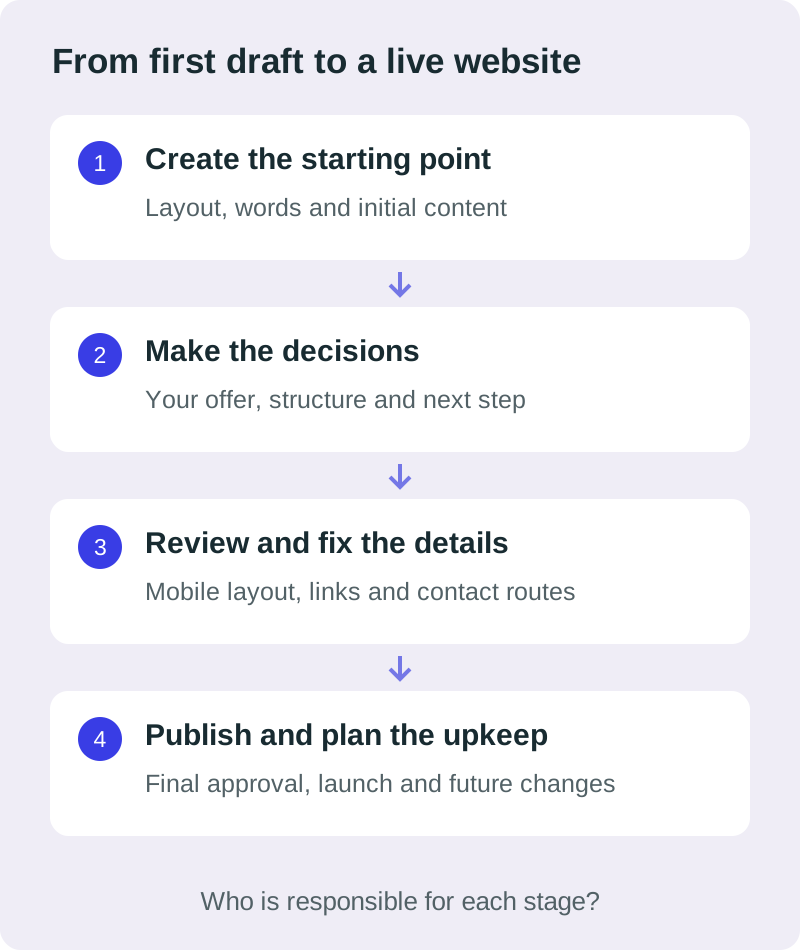
DIY, AI and a designer overlap. Responsibility is the real difference.
AI is a tool you or a designer can use. DIY describes who is doing the work. Hiring a designer describes who you are paying to help deliver it. In practice, the choice is often between building it yourself with a visual editor, building it yourself with AI assistance, or working with a professional who may use either.
| From your point of view | DIY with a builder | AI-assisted DIY | Working with a designer |
|---|---|---|---|
| My time | You learn the tool, create the content, build and check the site. | A first draft can be quick. You still brief, assess, revise and check it. | You provide business knowledge, content and feedback. The agreed delivery work is delegated. |
| My experience | Depends on your design, writing and platform skills. | Depends on your brief and ability to judge and improve the output. | You can draw on relevant experience; check the person’s work and process. |
| My spending | Tool subscriptions, domain, any extras and your time. | Tool or usage costs, hosting arrangements, extras and your time. | Agreed service fees, running costs and your own input. |
| Getting it live | You own the finish line. | You own it unless you arrange review and launch help. | Confirm who handles testing, setup and launch in the scope. |
| Changes later | You need time and access to make them. | Check editing, export and support before choosing the tool. | Agree editing access or paid support before the build. |
This is a decision framework, not a measured ranking of every tool or designer. The scope of the website and the person doing the work matter more than the label alone.
DIY can work well when your requirements and available time match.
DIY makes sense when the website is straightforward, you enjoy the process and you can protect time to finish it. A capable business owner with clear content and a suitable template may not need a designer for a simple first site.
The advantages
- Direct control: you can change wording and layouts yourself within the tool’s limits.
- A smaller initial service bill: you are doing the labour, although subscriptions and running costs still need checking.
- Useful learning: understanding the platform can help if you expect to maintain the site regularly.
The trade-offs
- Your time does several jobs: writing, selecting images, arranging pages, setting up contact options and checking the result.
- Decisions can stall progress: a large template library does not decide what your customer needs to see first.
- You need a way to spot problems: being able to move a button is different from knowing whether the contact route works.
My suggestion is to define a small launch scope and a realistic date before starting. If you can meet both without neglecting more valuable work, DIY may be the right choice.
AI can shorten the starting point. Allow time to judge the result.
AI-assisted DIY can suit an owner who has a clear brief, wants to explore directions quickly and is comfortable reviewing and refining the output. It can also help someone who knows their business but finds a blank page difficult.
The advantages
- A faster first draft: you can explore wording, layouts or a working prototype without creating every element manually.
- Quick experimentation: trying another direction can be less intimidating than rebuilding from scratch.
- Support with unfamiliar tasks: explanations and suggested changes can help you learn as you go.
The trade-offs
- A plausible draft still needs checking: business facts, claims, images and contact details must be accurate.
- Repeated revisions can consume the saving: it helps to know what you are trying to improve and when the site is ready.
- The practical setup still matters: check how the tool handles publishing, domain connection, editing and moving your content later.
If you use AI to generate code, review and testing remain part of the job. GitHub’s guidance for its Copilot agents makes that expectation clear for its coding tools. It is a reason to keep a review step, not evidence that every AI-built website is poor.
I use AI myself. The article on what a designer adds when AI can build a website goes further into how experience and those tools can work together.
A designer can take responsibility for the work you cannot keep fitting in.
Hiring can make sense when the website has a clear business purpose, your time is limited or the remaining details are beyond what you want to handle. You might be starting from nothing, replacing an old site or trying to finish an attempt that has stalled.
The advantages
- Experience applied to your brief: someone can question the structure, simplify the message and help you decide what belongs on the page.
- Delivery work you can delegate: the agreed design, build, review and launch tasks have a named person responsible.
- Help with the details: mobile layouts, image sizes, inconsistent wording and confusing contact routes can be dealt with as part of the agreed work.
The trade-offs
- There is a service cost: compare what is included and what renews, rather than comparing the fee with a tool’s introductory price.
- You still need to participate: nobody can reliably invent your services, business facts, preferences or approval.
- The person and agreement matter: hiring a designer does not automatically guarantee speed, good judgement or a useful result.
I bring more than 10 years of experience to my work. That is valuable when it helps us make better decisions and finish the agreed site. It is something you should be able to assess through examples, a clear process and the quality of the questions I ask.
Ask any designer what they will deliver, what they need from you, how revisions work and who checks and launches the website. Get the answers before relying on a launch date.
This is also the thinking behind my goal of helping 100 small businesses get online. I want business owners to have a practical way to explore getting help, especially when the website keeps slipping down the to-do list.
If you are considering that route, I offer a free initial website preview so you can see the direction before deciding. There is no obligation to continue. If you agree the scope and proceed, my initial fees total £175; the pricing page explains the hosting choices, ongoing costs and extras.
When does another evening of DIY stop being a saving?
If you are learning and moving towards a defined launch, that time can be well spent. The warning sign is repeating the same work without getting closer to a website you can use.
Think about your last few sessions. Did you finish a service page, confirm the wording or test the enquiry form? Or did you change the template again because you were still unsure what the site needed to do?
A simple time check
Imagine four three-hour sessions: 12 hours in total. If you choose to value your working time at £40 an hour, that is £480 of time allocated to the website.
That is an illustration, not a designer’s quote or money you have necessarily lost. Ask what else those hours could realistically have achieved, what you learned and how much work is still left.
A professional can be worth considering when the work you can delegate costs less than the time and uncertainty it removes for you. Compare the full scope: your briefing and feedback time, future costs and any work still outside the agreement.
The time already spent is useful context, but it should not force the next decision. You can keep the content and ideas that work, reduce the launch scope or ask for help with the parts that are holding you up.
Compare website build times and see how long two client projects took.
Judge every route against the same launch standard.
I would not judge the choice by how impressive the first screenshot looks. For a small service business, a more useful starting standard is:
- Customers can understand the offer: what you do, who it helps and where you work.
- The information is correct: service details, prices where shown, contact details and any claims.
- The next step works: an enquiry reaches the intended destination, or a booking link opens the right service.
- The pages are usable: text, navigation and forms work across relevant screen sizes and input methods.
- You can keep it running: account access, domain and hosting renewals, editing and support are understood.
Some details are easy to miss when you are looking at your own work. W3C’s first accessibility checks cover areas including headings, contrast, keyboard access and forms. Those are starting checks, not a complete accessibility assessment.
Loading and responsiveness also affect the experience. MDN explains why web performance matters to visitors. A website’s platform or use of AI does not remove the need to check it.
A well-prepared launch gives the site a chance to do its job. It does not guarantee enquiries, sales or search rankings. Your offer, audience and the ways people find you matter too.
Different business owners can reasonably choose different routes.
These are illustrative situations, not client case studies.
You have a simple offer and enjoy building.
You need a small brochure site, already have the content and can set aside time to finish it. DIY with a suitable builder could be enough. AI may help you explore the starting layout or improve a rough draft, with your own checks before launch.
You need to test an early idea.
You want a straightforward page to explain an offer and learn whether people are interested. AI-assisted DIY may help you get a first version together quickly. Keep the scope small, use accurate wording and check the contact route before sharing it.
Your business is operating, but the website keeps slipping.
You have services to sell and work to show, yet the website is still an unfinished task. Delegating the agreed work to a designer may be a better fit. Bring your existing content and unfinished attempt: some of that work may still be useful.
There is also a middle route. You might prepare the content yourself and pay for a defined review, repair or finishing job where a designer offers that service. Agree what can be reused and what needs rebuilding before assuming it will be a quick fix.
Decide what you can realistically finish, then choose the help you need.
Write down the answers to these five questions:
- What does the first live website need to do?
- When do I realistically need it ready?
- How much time can I protect for the remaining work?
- Can I judge and fix the parts I am currently unsure about?
- What am I prepared to spend to delegate those parts?
If DIY still looks sensible, set a small scope and a review point. If it does not, you do not have to spend another month proving that you can do every job yourself.
Before buying tools or hiring someone, use the website preparation checklist. Check the domain, hosting and email arrangements and decide how you will make changes afterwards.
If you want to explore working with me, the London web design guide shows the process and examples of my work.