


A domain is your address. Hosting makes the website available.
If you are setting up a small business website, you can quickly end up with several tabs open and no clear idea of what you actually need to buy. A domain, hosting, email, a website builder and an SSL certificate can look like one package, even though they do different jobs.
Start with this distinction: your domain is the address people use to find you; your hosting is the service that stores and serves your website. The website itself is the content, design and functionality that visitors use.
For example, a local electrician could use example.co.uk as the domain. The hosting makes the pages about services, areas covered and contact details available. An address such as hello@example.co.uk needs an email service as well.
You might buy these services from one company, or use different companies for each. Neither arrangement automatically makes the website better. The useful question is whether you understand what each service covers, who controls it and what it costs to keep.
Separate the five things you are paying for.
| Service | What it does | What to check |
|---|---|---|
| Domain | The address people type, such as example.co.uk. | Registration period, renewal price and account control. |
| Web hosting | Makes your website’s files and, where needed, its database available online. | Compatibility, resources, backups and support. |
| Website or builder | The pages, content and features customers use. | Who builds it, what you can edit and how you can move it. |
| Business email | Handles mail sent to and from your domain. | Mailbox allowance, storage, billing and any introductory period. |
| Ongoing care | Content changes and any agreed maintenance work. | Who is responsible and which tasks are included. |
A hosting subscription does not, by itself, mean someone is writing your service descriptions, designing your pages or updating your opening hours. A builder subscription may include hosting but leave you responsible for making the website.
If you are deciding whether your business needs a website in the first place, start with what a website adds alongside social media. This guide covers the setup behind it.
Choose a name you can say, spell and keep using.
I would start with your business name and the customers you want to reach. A useful domain is easy to read on a van, say over the phone and include in an email address. Avoid adding a string of extra words simply because a short version is unavailable.
- Keep it recognisable. Ask someone to write it down after hearing it once.
- Choose an appropriate extension. A .co.uk can suit a UK-focused business; a .com can suit a broader audience. Neither replaces clear content about where you work.
- Think beyond today’s offer. A name tied to one narrow product or location may become awkward if the business changes.
- Check the name before paying. Domain availability does not establish that a business name or brand is free for you to use.
- Compare renewal costs. A cheap first registration year can be followed by a much higher annual charge.
You do not need every available extension. If protecting a second version matters to your brand, decide deliberately rather than adding a bundle you do not plan to use.
Put the domain account under your business’s control.
The person who builds your website should not be the only person able to reach the account that controls its address. Use accurate registrant details for the appropriate person or business, keep the account accessible and agree how a developer gets the access they need.
For domains such as .com, ICANN explains the registration process: you register through a registrar and enter a registration agreement. Registration gives you the right to use the name for the agreed period; it is not a one-time purchase that lasts forever.
My practical checklist is to use a recovery email you can still access if the business domain stops working, enable two-factor authentication where available, keep payment details current and record the renewal date. Auto-renewal is useful, but it still needs a working account and valid payment method.
Do not assume you can ignore an expired domain and sort it out later. ICANN’s renewal guidance explains why expiry can disrupt services and lead to recovery costs or loss of the name. Rules differ by extension; check your registrar’s terms for your own domain.
DNS connects the services. It does not have to move them all.
DNS stands for Domain Name System. In everyday terms, it contains the directions that help an address reach the right service. Cloudflare’s DNS explanation describes how domain names are resolved into the addresses computers use.
Your website and email can therefore use the same domain while being hosted by different providers. Connecting a new website does not necessarily mean moving your domain registration or changing the email provider you already use.
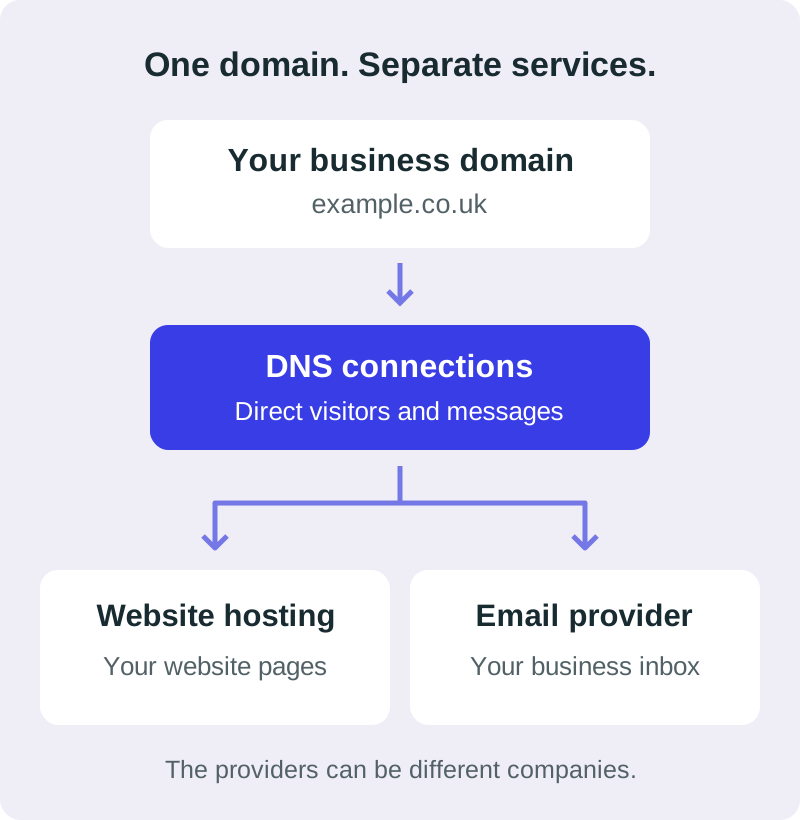
For example, a business could keep its existing email service while moving its website. Its DNS must continue to point mail to the correct provider: MX records control where incoming email is routed. Email authentication settings, including SPF, DKIM and DMARC where used, need to be preserved or updated correctly too.
Before changing nameservers or replacing DNS settings, ask whoever is doing the work to check the existing website, email and verification records. Copying only the website settings into a new DNS service can leave other services disconnected.
Choose hosting around your website, not the biggest plan name.
Before comparing packages, decide what you are hosting. A straightforward service website, a WordPress site, an online shop and a custom web application can need different setups.
| Your website | A useful starting question |
|---|---|
| Simple static website | Can this service host the supplied files and support the form or other tools we plan to use? |
| WordPress website | Does the plan support WordPress, its database, backups and the plugins the site needs? |
| Online shop | Is this a hosted shop platform or a store you maintain yourself, and who handles its updates and integrations? |
| Custom application | Does the plan support the required runtime, database and deployment process? |
Shared hosting generally means websites share server resources. It can be a practical starting point when the site’s requirements fit. Managed WordPress hosting adds WordPress-focused services, but you should still check the responsibilities and limits. Cloud hosting is a broad label: compare the actual resources and scaling arrangements. A VPS gives you a separate virtual server environment and can involve more administration, unless that management is included.
You do not need to become a server administrator to run a small business website. You do need someone to confirm that the plan suits the finished site. Ask your developer before committing to a long subscription.
Look beyond storage and the advertised monthly price.
A long list of features is less useful than a clear answer about how your website will be looked after. These are the things I would check first.
- Backups and recovery: how often are copies made, how long are they kept and can you restore one yourself? Ask whether email, databases and uploaded files are included.
- SSL and HTTPS: is a suitable certificate included and renewed automatically? HTTPS protects the connection; it does not mean every part of a website is secure or that a business is trustworthy. Cloudflare explains SSL/TLS and encrypted connections.
- Resources and limits: check storage, database and processing limits against your actual site. A plan’s headline website allowance is not a promise that every possible site will run well on it.
- Support: find out how you contact the provider and which problems they cover. Hosting support and help rewriting or redesigning a page are different services.
- Email: check how many mailboxes you get, their storage and whether an included offer ends after the first year.
- Moving later: ask what files, content and data you can export, and what work a move would require.
Performance also depends on the website itself. Large images, unnecessary scripts and poorly chosen features can slow a site even when hosting resources are available. Hosting is one part of the result.
If you want to update the website yourself, the hosting plan alone does not answer that question. Read how an editing dashboard changes the setup.
Compare what you pay today with what you pay to renew.
Hosting offers are often displayed as a monthly equivalent even when several years are paid in advance. That can be good value if the service suits you, but it is a different commitment from paying month by month.
Before you pay, write down five figures
- The full amount due today.
- The number of months or years it covers.
- The renewal price and renewal billing period.
- Domain and email renewals after any introductory inclusion ends.
- VAT and any optional extras added to the basket.
For illustration only, a fictional £3-per-month offer on a 48-month term means £144 upfront before tax or extras. If its fictional renewal rate were £10 per month, the equivalent cost would be £120 per year before tax. Those are examples of the calculation, not a quote for a current plan.
Compare providers over the same period and for the same services. A lower first payment can be followed by a higher renewal, while a higher initial payment may cover a longer term. Keep a copy of the final order summary.
Check cancellation and refund terms separately. ‘Cancel anytime’ does not necessarily mean you receive a refund for every unused month.
Hostinger: an option to compare, with the costs in view.
Ad · Hostinger affiliate recommendation
I may earn a commission if you purchase through my referral link. My own website is hosted on Hostinger. That is why I include it here; you can use another provider if it better fits your website.
Use the requirements above to compare the plan, renewal cost and responsibility for ongoing work. Buying a hosting subscription directly from Hostinger does not include my website design service.
Compare Hostinger plans (affiliate link)This is my referral link. Any referral discount, eligibility and combination with other promotions depend on Hostinger’s terms and the final checkout.
Ad · Black Friday 2026 price snapshot
Check the full term before choosing a deal.
Checked 6 November 2026. Hostinger’s UK Black Friday page lists its sale as 19 October–14 December 2026. Its hosting offer page showed:
| Plan | Introductory equivalent | Upfront term payment | Listed renewal equivalent |
|---|---|---|---|
| Single | £1.49/month | £71.52 for 48 months | £7.99/month, same term |
| Premium | £1.79/month | £85.92 for 48 months | £10.99/month, same term |
| Unlimited | £2.49/month | £119.52 for 48 months | £13.99/month, same term |
These advertised prices exclude VAT. They are a dated snapshot, not a guaranteed checkout price. Offers, eligibility, inclusions and renewal rates can change; check the final basket before paying. I have not applied an extra referral discount to these figures.
The domain sale page also advertised .com and .co.uk at £0.01 for the first year. Check the required registration term, total payment and subsequent-year charges. A first-year headline is not the total cost of keeping the name.
Selected hosting packages include a domain for the first year; eligibility depends on the plan, term and extension. Check mailbox introductory periods separately. Hostinger explains free-domain eligibility.
Read the refund policy too: domain renewals and successful transfers are not refundable, and .uk registrations, including .co.uk, have exclusions. A hosting refund offer should not be read as a promise that every item in your basket can be refunded.
Buying your own hosting and using my service are separate decisions.
If you are working with me on the current straightforward website offer, speak to me before buying a package. We can confirm what your site needs and whether you want me to host it or supply the files for suitable hosting you arrange yourself.
- Hosting with me: £25 one-off activation plus £150 for the first year’s hosting, totalling £175 initially. Hosting then renews at £150 per year.
- Your own hosting: my fees still total £175: £25 activation plus a one-off £150 fee. You pay the hosting provider separately.
Your domain, business email, optional maintenance and agreed extras are separate. A discounted Hostinger subscription does not replace the fees for my service.
The initial website preview is free, with no obligation to continue. The website costs guide and pricing page explain what happens if you choose to proceed. For regular changes after launch, read how updates and optional support work.
See how I handle hosting and domains on my website projects.
You can change hosting without starting your business again.
Moving hosting, transferring a domain registration and moving business email are three different jobs. Sometimes they happen together, but they do not have to.
A sensible move starts with a working copy of the site on the new service, an inventory of the services connected to the domain and a plan for switching the website traffic. Keep the existing service available until the new setup has been tested and any necessary data is moved.
Check important pages, forms, bookings and payments, where used. Check email separately. If page addresses change, plan redirects rather than leaving old links broken. DNS caching means visitors may not all reach the new server at precisely the same moment.
If you also want to move the domain to another registrar, check the extension’s transfer requirements and any applicable locks before choosing a date. ICANN’s transfer guidance explains the distinction for domains covered by its policies. Your registrar should confirm the rules that apply to your own registration.
Website-builder sites can have different export limits from sites where you have the files and database. Ask about portability before paying, not only when you are ready to leave.
The questions I would settle before checkout.
Can I buy a domain before I have a website?
Yes. You can register the name first and connect a website later. Keep track of its renewal even while there is nothing published at the address.
Do the domain and hosting have to be with the same company?
No. Keeping them together can simplify billing; separating them can suit an existing setup. In either case, keep access to the accounts and know who manages the DNS.
Does a domain include an email inbox?
Not automatically. Check whether a mailbox service is included, for how long and what it costs afterwards. An address that only forwards messages is different from a full mailbox.
Does paying for hosting mean someone will update my site?
Only if that work is included in the agreement. Provider support, software maintenance and changes to your business content can have different responsibilities and costs.
Should I wait for Black Friday?
Compare a verified offer against your requirements and launch timing. A saving is useful when the plan fits and you understand the commitment. A deadline or discount should not make that decision for you.
What should I do first?
Write down what the website needs to do, what you already own and which services you already pay for. The website preparation checklist will help. If you would like me to build the site, request your free website preview before committing to hosting, or explore my London web design guide for the process and examples.